Agentic Research Best Practices
Some notes from myself and the Mila community on how to use agents to do research effectively.
Philosophy Behind Agentic Research vs. Agentic Engineering
Many of the previous coding best practices now feel archaic and incorrect. Over the past 15 months I have been experimenting with agents and trying to keep up with how engineers are using these tools, and adapting them to my research workflows. This is a collection of notes I’ve settled on in my own experience and with my collaborators at Mila, on the topic of doing research using coding agents. I’m not focused on productivity maximizing engineering practices per se, where the only thing that matters is a robust final product. The ultimate goal of research is to build and transmit understanding of the natural world, so speed is bound by my ability to keep up with the system, to ensure it’s intelligible to myself and others.
Research codebases have unique requirements compared to other kinds of software. They don’t have users. They have active developers before the paper is finished, and consumers of a static artifact after the paper is complete. A lot of the default design assumptions of coding agents are therefore miscalibrated for the type of code you would ideally like to write. Your codebase must:
- Be highly portable and reproducible - they must reflect exactly what was run to produce the paper.
- Be easy for others to understand quickly and hack on.
- Be correct - tests, docs, comments, code, and the paper itself must match precisely.
- Work in a way you fully understand.
Your codebase need not be:
- Production grade.
- Full of complex abstractions geared towards maintainability or extensibility over a long lifespan.
- Concerned with things like API breaks, legacy code paths, or other complexities required to support users.
My workflow is still rapidly evolving, but already it has enabled very large speed ups in idea iteration, somewhere between 2-10x. Sometimes, a pure engineering approach can be taken (the type you see espoused by agent maximalists on X dot com), but only for sub-components of the project, and therefore one needs a good system for working while maintaining understanding and visibility. I am not discussing automating the research process itself - a much more ambitious goal that I don’t think is easily solved on one’s own. I want to talk about how to use these systems to drive research projects more efficiently.
This is a high level schematic of the workflow, which will hopefully be clear by the end of the post:
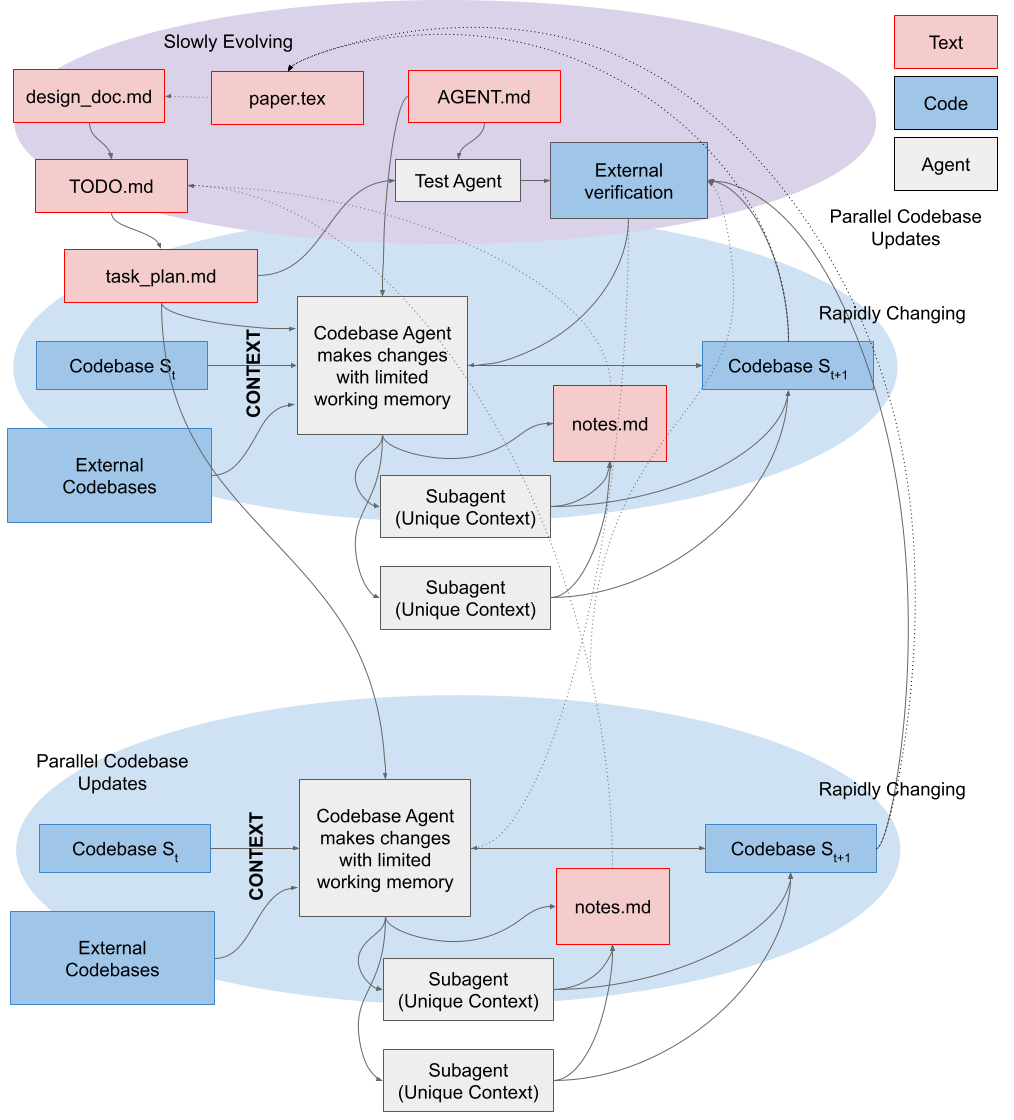
paper.tex) / markdown (design_doc.md) descriptions of the goals of the projects, methods, and broader context of the codebase. AGENT.md is high level role information given to every agent, which orients the agent to your project's "database". The design_doc.md can then be broken down into a linear set of objectives / tasks roadmap.md. This can be further broken down into individual task_plan.md with granular details on each implementation. These plans are crucial to give the Agents small enough problems to be solved without filling context. The agent's context will be filled with important information from your codebase, and optionally external reference implementations. During the implementation, external verification of correctness is crucial. These are ideally provided by you or independently by agents not involved in the implementation to reduce the likelihood of test-cheating. During the implementation, discoveries are often made — these can be recorded in notes.md, and if necessary, those notes can be summarized and integrated back into the high-level roadmap periodically. While agents are transient, both text and code should be committed to the repo regularly to make changes / rollbacks easy to achieve. Each agent can also own subagents, which receive their own sub-tasks, enabling more work to happen in parallel in sufficiently small chunks. For example, if you want to generate a report on the current codebase's security vulnerabilities, this is easy to parallelize and you can simply ask for different subagents to handle different modules of the codebase. In addition, you can manage multiple agents to handle multiple parallel issues simultaneously (and each can have their own subagents). These parallel streams of work can synchronize their contexts both via the codebase's state, and the regularly updated notes.md / plans.md. Learn to Manage and Transmit Context
Coding agents should be used by every researcher as a best practice - wielded properly, they produce far more robust and trustworthy code. To reap this benefit you will need to learn the skills of a senior researcher: planning of multiple directions in parallel, management of tasks, birds-eye level debugging, clear communication, and comfort with other people’s code. This is not an easy task, but now one can practice them with nearly limitless agents, instead of waiting for real-world supervision or management opportunities, so you can begin now.
Assuming zero speedup from the actual act of writing code itself (if you are one of those cracked aliens I keep hearing about), the benefits are still immediate and considerable as they allow you to transmit large volumes of information to yourself (in the future) and others:
-
Agent context is your context. Every senior researcher or PI struggles with the cost of task switching. It is a hard skill to master, and limits many people’s ability to do deep work. With agents, you can much more easily switch between contexts that are stored in parallel chats, and offload the systematic, recall-heavy elements of deep work (remembering APIs, reorienting yourself to previous implementation specifics) to your agents. This does not mean you can avoid understanding those specifics ever, but it does mean that during an hour between meetings, you don’t.
-
Agent context is your colleague’s context. Asking agents to explain recent changes to you is very efficient: they are excellent at navigating git trees and can quickly elaborate on code changes quickly for your colleagues with a few prompts. This is particularly true if the entire team commits to following a rigorous PR workflow with many small commits and detailed commit and PR messages, which your agents can both generate and consume as future context. This means less meetings and a lower documentation burden while working with collaborators. Agents are the right way to parse spaghetti code at 4AM to diagnose an unexpected change in a plot.
In general, when trying to ship information around, agents are an effective way to expand on an idea or query quickly, and after refining, these ideas can be distilled into a document or code. This means another person’s agent can then ingest the reference and reduce it down to the minimum required to satisfy their own understanding.
| person A | → | agent A | → | doc/code | → | agent B | → | person B |
| expand | distill | expand | distill |
The Agent File
Keep these short - they’re always in your context, so should only contain universal rules. Context rot is pernicious and large context limits are largely marketing lies. Your agent performs best in the 100-300k token range regardless of context length.
I’ve learned to ask for the following:
- Do not make assumptions: if my instructions are unclear, ask me as many clarifying questions as required to remove all ambiguity.
- This is a research codebase. Do not maintain any silent fallbacks as we change the code. Fail loudly.
- This code should be explicit to the reader. Do not use complex engineering patterns when simple ones will suffice, unless I explicitly ask for modular or scalable solutions.
- While working, do not remove previous comments unless the underlying logic changes and the comment is incorrect.
- While designing solutions, please refer to codebase
/path/to/code/aand/path/to/code/bfor examples of good architectural decisions, correct implementations, required features, etc. - Prioritize reproducibility and clarity over clever design and efficiency.
- When designing solutions, ensure they are aligned with the high level project plan in
design_doc.mdandpaper.tex. - Each TODO item in
TODO.mdshould be committed separately.
Research Context Engineering as a Text-based Notion
Producing a clear plan and scaffolding for your agent greatly affects the results. Treat your AI like a junior engineer or researcher: highly capable, given clear instructions and context to succeed. This puts the onus on you to sufficiently understand your problem before you start building, and to take a step back and slow down if you realize you are missing something.
One unclear instruction can produce one hundred bad lines of code that contaminate your codebase and creates compounding confusion: without good context management, future agent sessions will not immediately realize that this contaminated code is recently added and therefore suspect if something is going wrong, so it will be on you to hunt it down. In pure engineering, the expected result can be precisely defined with some effort, mitigating the risk of ever generating such code. In research it is generally much harder to provide such a precise requirement for your project, so more weight is placed on the initial instructions provided and your follow up interrogation of the output, before you learn what can be strictly asserted in a test. This is why agents in the hands of amateurs can cause equal parts euphoria and strife.
I like to think of the research artifacts as a continuum of text files spanning the paper itself paper.tex and the codebase, with many intermediate documents in between the two. These files all mutate at different rates: the paper rarely or never does, the codebase’s lines of code turn over like cells in the body. This hierarchy of temporal coherence stabilizes the project while allowing the codebase to mutate quickly.
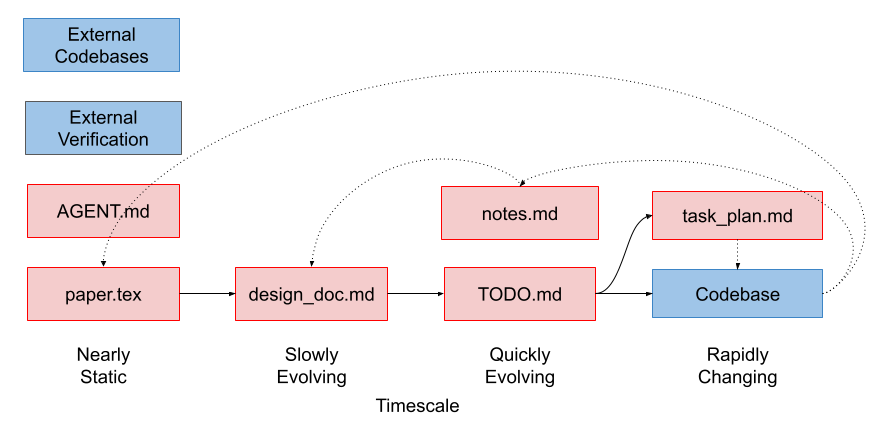
design_doc.md and paper.tex
As an initial step in a project, I like to draft my ideas as either a design_doc.md or paper.tex, depending on how formal I want to be. paper.tex, being the final product of the project, supersedes design_doc.md in cases where I have both, and often the design_doc.md is generated from the paper and detailed discussion with a chatbot. In either case, this document captures:
- The problem we are trying to solve or question we are trying to ask, the methods we will use to address it, and other relevant details required to structure the project.
- A linear roadmap of medium and short term objectives required to build out the project.
- High level project architecture that the agent should respect when designing new features so that you don’t end up with parallel systems providing similar or identical features. This should be provided at a fairly high level of abstraction but can include class signatures etc if you have a desired API or data flow that you want the project to respect. In general, I find it best to copy the architectures of existing reference codebases, allowing the AI to fill in the details.
Usually, I will write the core idea myself, debate it with my agent, and then ask my agent to help me break it down into the roadmap. I review this document very carefully - every decision here has big impacts on the final codebase because this is where the agent is going to draw many of it’s assumptions from.
plan.md and todo.md
From each element of the roadmap in design_doc.md, one can ask your agent to break each phase down into a plan, perhaps containing a list of concrete todos. The level of granularity here is proportional to the complexity of the project and find myself skipping this layer of abstraction for smaller projects (the TODO and design doc can coexist for those). The purpose of these subtasks is to give each agent a well-scoped feature or item to work on that fits easily in $<20%$ of it’s context window.
In order to make sense of your plan during implementation, your agent will grep around your codebase to find relevant elements. Depending on the structure of your code, this might be an inefficient use of context during implementation. For complex codebases where targeted interventions are required, it is useful to ensure your plan has all of the relevant landmarks in your codebase (line numbers, function / class / attribute / variable names, etc) which will orient the implementation agent directly to the important parts of your codebase.
In general, these documents can be generated entirely by AI. They all treat the keyword “plan” as a distinct task - to produce a markdown document. I have a superstition that it’s actually better to do it this way because the plan is more likely to “make sense” to your agent if it’s written in it’s own voice. This is also a good opportunity to ask your agent to ask clarifying questions about the plan while writing it, so ensure you are aligned.
Unless a task is simple, I use a unique agent to plan and another to implement, so that only the subset of the relevant planning context is consumed by the implementation agent.
I find it a good practice to make each TODO item a single commit.
notes.md
On complex projects, while building, discoveries are often made. These might be quirks of the algorithms themselves, limitations of particular libraries, gotchas on particular compute clusters, the result of implementation research of other codebases, etc. These kinds of findings often don’t have a natural home in the plan documents but are important context to agents who are trying to solve problems in-flight. I like to maintain parallel notes.md files to store this information. These notes should periodically be compacted and maintained to keep track of only the elements which are not yet encoded in the codebase itself (as e.g., comments).
Treat git like Savegames, Rely on the Commit History
As mentioned already, each TODO item should be committed separately with clear commit messages. These are your savegames - agents use git more professionally than any researcher I’ve ever worked with, and it’s extremely powerful in the right hands. Ask your agent to use git fastidiously - it’s generally better to let it drive this tool than for you to do it yourself. Ask your agents to produce PRs with detailed messages to add features to your codebase. This provides crucial context for code milestones for future you, your collaborators, and your agents.
What this enables is asking your agent:
The metrics for this experiment changed drastically in the past two weeks, but I’m not sure why. I have a few theories (insert theories here). Can you look through the history to determine when these changes were made so we can diagnose what change was made that produced this result?
Your agent will rapidly traverse the git history, reading the commit messages and code diffs along the way, to help you rapidly converge on the possible causes of your issue. In projects with a few collaborators and many moving parts this can easily save you a day of running in circles in 20-30 minutes.
As an aside - this is exactly why having actual tests is the gold standard - the breaking change would never have been allowed to be made in the first place. But since test driven development is inefficient and often too challenging or impossible to do quickly in a research codebase, this workflow serves as a good backup strategy.
You can also use worktrees - which allow multiple agents to work in parallel copies of the codebase in a single project, implementing features in parallel on your machine. This is the sort of advanced git tooling that researchers almost never touch due to the complexity, but they can produce big performance unlocks when you let the agents handle the complexity for you. For everything git, it’s probably easier for you to ask your agent to do it directly. It’s worthwhile for researchers to start experimenting with advanced features to see how it improves your workflow.
TODOs Manage Per-Agent Context
The planning work done before now allows us to pass each agent tightly scoped context to enable the work the proceed smoothly. For each TODO, I follow a workflow approximating the following:
- Pass TODO to agent.
- Agent implements, and we run verification.
- If verification turns up something is wrong about our plan, we diagnose together and store any learning in
notes.md. These notes inform future rounds. - When the step is done, we have the agent produce a
handoff.mdfile to pass to the implementation agent for the following TODO. This contains any relevant context from this implementation round that should be useful for the next TODO. - The next TODO is handled by a new agent, which consumes the handoff.
Testing
Software engineering practices act as guidance for AI generation and are pretty much required for good results. AI works best when it can verify that it has done the right thing. Ideally, this means you have an executable test that ensures your code is correct. These can be written by independent test agents, provided with specific instructions to produce the correct code behaviour. Agents benefit from working code examples to copy from and verify against - working tests provide this and massively constrain the design space, making test driven development well-suited to agentic R&D.
Write simple tests/assertions or ask the model to generate tests verifying specific behaviours for you before asking for code. Use independent test writing and code writing agents, so the tests are less likely to be cheats to make the code pass.
Agents also benefit from linting, typing, docstrings, and assertions to verify the code matches intent.
Tooling, Safety, and Environment
Don’t trust your AI, they’re mostly correct but have no regrets when making irreversible mistakes, which can often happen when agents are working in parallel and each is not aware of the other’s work.
For sensitive tasks like database migrations or large filesystem manipulations, have your agent output a script you can verify and run by hand instead of trusting the full work to the agent directly. You can cross-reference this script with another agent as a sanity check as well. Things that exist only in the agent’s working memory are subject to mutation, things written on disk are static - leverage this.
Anchoring your Paper to your Code
While the final product of your work is typically seen as your paper, the majority of your work lives inside of your code. Throughout this process, we have been having design decisions flow from the paper, through the design docs, into plans and notes, and finally into the code. Discoveries and learning along the way inevitably mean the final product is not exactly that you initially intended - that’s research. So it’s crucial all of those small deviations from the original plan make it back into your paper. Luckily, agents are particularly good at identifying discrepancies between two texts, so this sort of thing works well:
Please do a thorough analysis of the methods and results sections of the paper, and compare them against the codebase we have developed. Use a set of subagents to do this work in parallel. Ensure that all methodological details are captured in the paper, and that all results presented arise from the methods as described in the paper, noting any subtle deviations in the math from the current implementation. Don’t edit the paper directly, we can diagnose each deviation together sequentially before committing to a final fix.
Then, this corrected document can be uploaded to a platform such as overleaf for a final round of writing with co-authors.
Putting it All Together
These practices converge on a specific loop:
- Explore: Ask the AI to read relevant files to strategically fill context. If required, write new findings down in
notes.md. - Plan: Write a high-level specification for some new feature.
- Linearize the Implementation into TODOs: Break down the plan into bite-sized chunks of work.
- Produce Constraints: This is the step that most distinguishes agentic R&D from ad-hoc prompting. Create tests or assertions, add types, docstrings, and boilerplate (or ask the AI to generate them), spell out explicit DO NOT requests, and pin down any other design requirements in your plan or in code as exactly as possible. Be explicit about everything relevant.
- Generate: Ask the model to write the feature.
- Verify/Repeat: Run the per-TODO inner loop described in §TODOs Manage Context — run tests & linters, review the changes, and on verification failure diagnose together and record learnings in
notes.md. Once satisfied, produce ahandoff.mdand begin again at step 1–4 with a fresh agent (most often, skipping straight to 4).
paper.tex) plans feed into markdown (design_doc.md) descriptions of the project. AGENT.md provides global rules every agent. The design_doc.md is linearized into TODO.md, each of which becomes a task_plan.md, and code changes. Agent context is scoped to the important information from your codebase, optionally external reference implementations, and your notes. External verification of correctness happens where possible, provided by you or by independent agents. Discoveries are recorded in notes.md. If necessary, notes are summarized and integrated back into high-level docs. Both text and code should be committed to the repo regularly to make changes / rollbacks easy. Agents can own subagents, which receive their own sub-tasks, enabling small chunks of work to happen in parallel. You can manage multiple agents using worktrees to handle multiple parallel issues simultaneously (each can have their own subagents). These parallel streams of work can cross reference each other's code / docs where required. A New Standard for Research Code
We should raise the bar as a community for what constitutes acceptable research code. Before, the below requirements were too strict to allow for a reasonably fast project turnaround time with a small team - but that is rapidly changing.
-
Projects typically start with a project plan which becomes the paper itself. This
design_doc.mdserves as a crucial starting point for the development of your new codebase, and your agent can consume it to help iterate on implementation ideas. There should therefore be explicit deep connections with thedesign_doc.md&paper.texthroughout your codebase. -
Typing, Comments, Docstrings, Variable Names not only helps the coding agents do their jobs, but helps downstream users reason about your code and understand how your paper is reflected in your code. Often deferred until the project’s end or never done at all - there is now a great incentive to do it throughout development as it directly benefits agent performance.
-
Testing is also a very helpful constraint for your coding agents to ensure they are building within spec, give you confidence in your own results, and also make it much easier for others to build on your work.
-
Thorough Demonstrations can now be built in a single sitting, which can greatly help the reader understand how your proposals work on real data interactively.
Tricks for Better Performance
Warm Start Your Project
Your current codebase is a crucial part of the context used by agents when interpreting the intention of your prompt and the design space. This context constrains the set of possible generations that satisfy your prompt. If the repo is messy or incorrect, performance degrades because the context is misleading. When your repo is empty, performance degrades because the space of possible generations that match your prompt is much larger. You can test this easily by comparing the ease of use designing complicated features for mature libraries vs designing simple projects from scratch entirely using agents.
You should never need to start fully from scratch. If you don’t want to build your project using a fork of another project, you can provide reference codebases from which to draw inspiration: these can be specified to guide methodological details or architecture. You can also build from a set of “stubs” - functions / class signatures that provide the high level structure of the architecture with the code details left unimplemented.
Roles
I’ve discussed using agents fairly linearly, in a plan -> implement -> verify loop.
Most of these individual tasks are best handled by different independent agents. To date I have not found much use for predefined skills for various subtasks - I tend to ask for specific “skills” directly in my prompt while problem solving. Perhaps I will evolve here and add a more structured workflow. In the meantime you can see Claude’s Skills for examples applied to specific domains.
The kinds of roles I tend to ask for in one off prompts mostly include:
- Correctness reviewer.
- Test designer (best if done before the functionality is written and the agent is provided with clear requirements).
- Evaluator of the code’s intention vs the various docs we have written.
- Comparison of the codebase against external references.
- Data flow analysis to identify parallel pathways for data flow, and to identify refactoring opportunities to improve extensibility toward a long-term roadmap goal, or implementation simplification.
- Research: evaluating the literature, or finding discrepancies in the implementation vs. the docs, or subtle changes between two implementations.
File Structure as Memory uses skills to keep the core agent.md file small with only universal rules, and pointers to various skills.md required for specific tasks. Since agents often only need to do one of these things at a time, context is better scoped this way. For example, asking the agent to implement something points agents to guidelines/coding.md, and asking the agent to draft a methods section points it to guidelines/latex.md.
Generate Clean Code - Your Generations Become Your Context
The superhuman speed of code generation makes it easy to get overloaded and stop paying attention. There a few ways I’ve found to manage this.
-
Constrain the diff. Without explicit scoping, agents will produce overlarge diffs that are tiring for humans to manage and blow up context, miss already-implemented features and reimplement them from scratch, or try to nail every concern in a single pass. Counter all three by being explicit about what to touch and what to reuse:
- Define the exact regions to manipulate, and ask the model to generate only the relevant code.
- Name the existing pieces it should leverage: “I want to build feature A — please use X, Y, Z to accomplish it, and ensure it passes these tests.”
- When one-shot success is unlikely, plan the work as two passes — a rough build, then a refactor (plan to throw one away). Often easier than getting it right in one go.
-
After the code is built, you can ask for a high level summary of how the new additions work with a fresh, unbiased agent. If something is off, you can critique the design at this level of abstraction and fix it before moving on. These sorts of conversations often lead to design decisions worth capturing in your
notes.md, and occasionally are the result of an underspecifieddesign_doc.md, which should be updated. -
It is better to correct issues with the implementation through the agent chat, rather than doing it yourself. If you want, you can provide the exact solution you desire in the chat. If you change the code directly, it will not match the agent’s context and this can produce strange behaviour.
Managing Costs
This section is primarily for graduate students and others who do not have expensive plans and want to get the greatest bang for their buck.
- Different products count usage differently. It is worth checking how many tokens each tool uses (by comparing them on similar tasks).
- Managing your context well limits your token usage!
- Plan & break down into tasks with heaving reasoning models (e.g., Opus), then execute each TODO with cheaper models (e.g., Sonnet).
- Minimize what you put in your planning docs, regularly compact that information to prevent context bloat.
- Do rounds of refactoring and simplification on your code to prevent context explosion and running in expensive circles (spend money now to save money later).
- Restart your chats frequently, but not too frequently. For best performance, try to stay under <40% context usage. For best cost-efficiency, it’s important to remember that each context re-start spends a bunch of tokens getting the agent up to speed on the problem. If you’re solving two related problems in sequence, you can probably avoid the reset.
Postscript - Game Engine Design Challenge
Many research codebases are relatively small, and might not be the best place to practice the finer points of how to effectively wrangle agents. If want to practice the craft and develop your intuition, I suggest building a 3D game engine. There are many open source game engines out there (e.g., godot or o3de) you can use as a reference, and these engines typically require substantially more code to be written than research libraries. Pick your favorite older game and try to re-create a working prototype or playable level. It’s addictive and will stress your ability to write specific specs, manage context, and come up with clever verification strategies beyond simple tests, because sufficiently sophisticated games are actually quite hard to test and the agent will often incorrectly state they’ve solved a problem when things are wildly wrong. This will sharpen your ability to describe requirements to the system with a tight, interactive feedback loop.
Game engines share some similarities with research from a development perspective. Getting the desired behaviour out of what is effectively a physics simulator with game logic bolted on requires a precise description of behaviour that might not be easy to explicitly encode in a test - instead, you will likely playtest the engine to view the results of your recent changes. It also is an amazingly creative endeavour, which opens up a lot of opportunities for experimentation and design.
This is my project: a modernization of an old favourite of mine. It has taught me a lot about effective workflows with codebases easily 10x more complex than what I work with on a typical research project. I’m far from done, but this is an example of the sort of thing I could never have dreamed of pursuing alongside my career before agents.